
Help / Getting Started / 1 min read
Understanding Your Dashboard
Use the Command Center, workspace navigation, and action queues to plan your day.
Verified August 13, 2026 · FastIQ staging; Leads workspace badge v1.10.0, Admin workspace badge v1.10.2
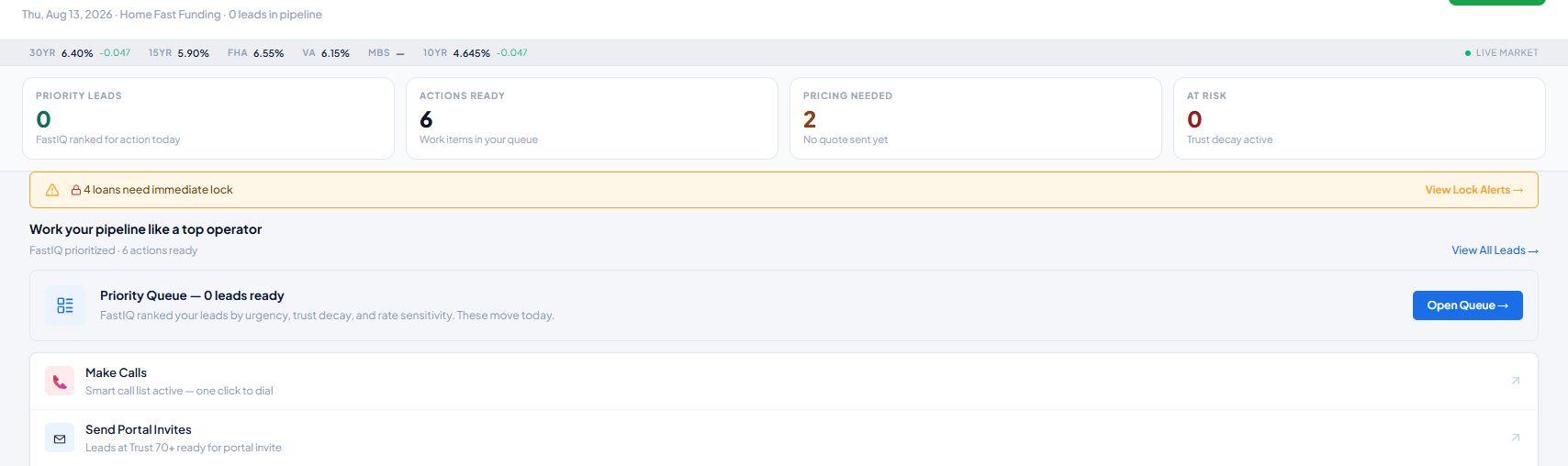
The Command Center is the main operating view in the Leads workspace. It combines market context, prioritized counts, alerts, and direct links to the work FastIQ recommends next.
Choose a workspace from the top navigation
- Leads: Command Center, lead lists, pipeline tools, communications, portal activity, opportunities, and personal performance.
- Pipeline: active loan and processing work.
- Partners: partner relationships and partner activity.
- Marketing: campaigns, content, and marketing operations.
- Pricing: pricing tools and lender results.
- Intelligence: FastIQ intelligence and AI tools.
- Admin: organization settings and administration, when your role permits access.
Read the Command Center from top to bottom
- Live market strip: a quick view of current market indicators.
- Priority Leads: leads FastIQ has ranked for attention.
- Actions Ready: work items waiting in your queue.
- Pricing Needed: leads that do not yet have a quote.
- At Risk: files where the dashboard has detected active trust decay.
- Workflow actions: direct links to the priority queue, calls, portal invitations, pricing, and other available work.
Use the sidebar and header tools
The left sidebar changes with the workspace selected at the top. In the Leads workspace it includes lead tools, opportunities, and performance pages. Header tools provide search, New Lead, phone, notifications, workspace selection, and account access.